

Report an issue
Use Report Issue when something in Neoflo doesn’t work as this guide describes. Neoflo attaches a screenshot of the screen you were on, so open it from the screen where the problem is.1
Select Report Issue, the question mark near the bottom of the left rail.
2
In Select your Issue Type, choose the type of problem.
3
In Please provide details, describe what happened. Include the ticket number and the invoice number.
4
Check the screenshot Neoflo attached, named "system_ss.jpg". Select Open screenshot to see it, or the × beside it to remove it.
5
To add more, select Upload under Attach documents (optional). JPG, JPEG, PNG, BMP, WEBP and MP4 files work, up to 1 MB each and 5 MB in total.
6
Select Submit.
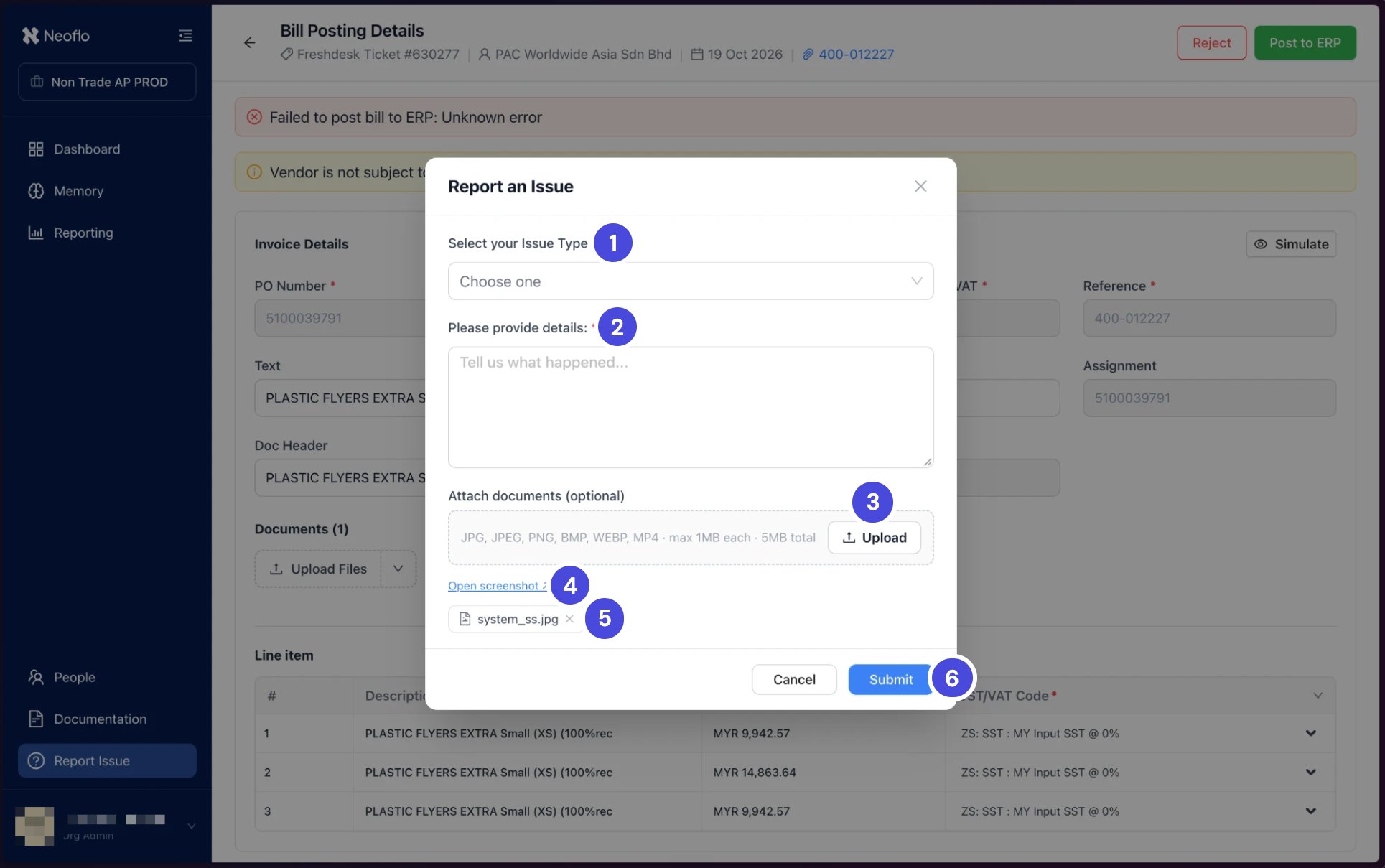
Report an Issue, opened from a posting that failed. The screenshot of that screen is already attached.
1Select your Issue Type
2Please provide details
3Upload
4Open screenshot
5The screenshot Neoflo attached
6Submit
What happens nextYou receive an email with a ticket ID for your report. Quote it if you follow up.